Hiring Signals: When Capital Becomes Headcount

Hiring Signals: When Capital Becomes Headcount
Published: May 2026
A company closed a Series B last quarter. You know the round size, the lead investor, the announcement quote about "scaling go-to-market." You even know which spend categories the founder named in the press release. What you do not know, and what actually determines whether your outreach lands this week or in six months, is whether the company has started spending yet.
That gap, between stated intent and real execution, is where most outbound timing goes wrong. Fundup AI now closes it. Today we're shipping Hiring Signals, the companion to Spend Intent Intelligence. Spend Intent reads the funding announcement and tells you where the capital is planned to go. Hiring Signals read each company's live open roles continuously and tell you whether the capital has already started moving. Together they make a funded company's real trajectory legible from the outside.
The missing half
A founder can announce "we're hiring twenty engineers" and then sit on the budget for two quarters while the round paperwork settles and the head of engineering finishes their notice period. From your seat outside the company, the announcement looked like a buying signal. From the inside, nothing is happening yet.
The careers page is where intent becomes evidence. When a company posts a role, somebody at the company has signed off on a hiring requisition, a budget line, and a reporting structure. That is the earliest possible moment that capital starts touching the real world. Reading it tells you something the press release cannot.
So that's what we built. Fundup AI now reads every company's live roles continuously and classifies them into named signals.
Four tiers of signal
Confirming signals: the buying window is open
These fire when stated intent meets real hiring. The company said sales, and there are sales hires. The company said R&D, and there are engineering hires. Five labels live in this tier:
- GTM Confirmed: sales capital plus two or more sales hires. Commercial execution is underway.
- R&D Confirmed: R&D spend plus two or more engineering hires. The product roadmap is being staffed.
- Expansion Confirmed: expansion capital plus active sales hiring.
- M&A Exec: M&A budget plus senior leadership openings.
- Hiring Capital: funding explicitly earmarked for talent, and the requisitions are live.
When you see a confirming signal, you are not predicting a buying window. You are looking at one that has already opened.
Divergence signals: the early warning
These fire when budget is allocated but headcount is missing. The company has the money. Nobody is being hired against it yet.
- R&D Diverge: R&D spend but no engineering hires.
- Sales Diverge: sales budget but no sales hires.
- Marketing Diverge: marketing budget but no marketing hires.
- Stealth Hiring: hiring budget with very few public roles.
For some categories of seller, divergence is more valuable than confirmation. If you are selling sales tooling and you see Sales Diverge on a Series A account, you know the company will spin up a sales team in the next ninety days and you are the salesperson who shows up at the front of that process, not at the back.
Role-based signals: the shape of growth
These describe how a company is hiring right now, independent of what the round announcement said.
Engineering Push, Sales Push, GTM Push, Product/Design Push, Executive Hires, Senior-Heavy, Growth Mode, Remote-First, Ops Build-out, Customer Experience. Each one has a specific rule behind it (Executive Hires requires two or more management roles, Senior-Heavy means 50%+ of openings are senior, Remote-First means 60%+ remote across at least three roles, and so on).
The point is not the precise threshold. The point is that you can look at a company and immediately see what kind of team they are becoming, before you write a word of outreach.
Intensity signals: the pace
Two open roles is normal. Twenty open roles on a forty-person company is something else.
- Aggressive Expansion: open roles equal 20% or more of current headcount.
- Significant Growth: open roles equal 10% to 20% of current headcount.
There are also geo-specific signals for concentrated location hiring, which matter when you care about regional presence.
The pairing
This is the part that matters most.
Spend Intent and Hiring Signals are designed to be read together. Three patterns are worth memorizing:
- Spend Intent + matching Hiring Signal. The strongest possible buying-window indicator. The company said the money was going somewhere, and it has already started going there. Lead with relevance, name the specific intent, reference the hires that prove it.
- Spend Intent without the matching hire. A divergence pattern. The company has the budget and the stated direction, but execution has not started. This is the early account, the one your competitors miss because there is no obvious activity yet. The buying window is in front of you, not behind you.
- Hiring Signal without prior intent. The company is moving faster than its last announcement suggested. Something has changed since the press release. Worth understanding what.
Reading the pair is a one-glance qualification that used to take an hour of LinkedIn and press-release skimming.
The department breakdown
Naming signals is the headline feature. The breakdown is the part you will actually use every day.
When you open the Hiring Signals tab on any company, the left panel shows a clickable per-department bar chart: Engineering, Sales, Marketing, Design, Operations, Management, Finance, HR, Support, Executive, Communication, Legal, Other. Bar lengths are scaled to the largest department, so the shape of the team is visible at a glance.
Click any department and the right panel filters the role list to that function. Each role carries two tags: seniority (Executive, Director, Manager, Senior, Mid, Junior) and work mode (Remote, Hybrid, Onsite).
The result: a sales rep selling to engineering leaders, on an account with twenty open roles, can in thirty seconds answer the questions that used to take half an hour. Who is hiring engineering? Are they hiring at the level my buyer cares about? Are they staffing the team I would be selling into? You see the buyer persona before you write the first line.
The Hiring Signals tab also surfaces the live open-role count and a one-click Open Roles button that jumps directly to the company's career page, so if you want to read a specific job description before drafting outreach, it is one tab away.
What it looks like in the product
Open any funded company in screening. In the modal header you'll see an Open Roles button when the company has live listings. The Hiring Signals tab joins the others on the in-modal nav. Inside the tab: a "New" indicator when the data was synced in the last two days, a last-sync timestamp, the signal cards at the top, the department breakdown beneath.
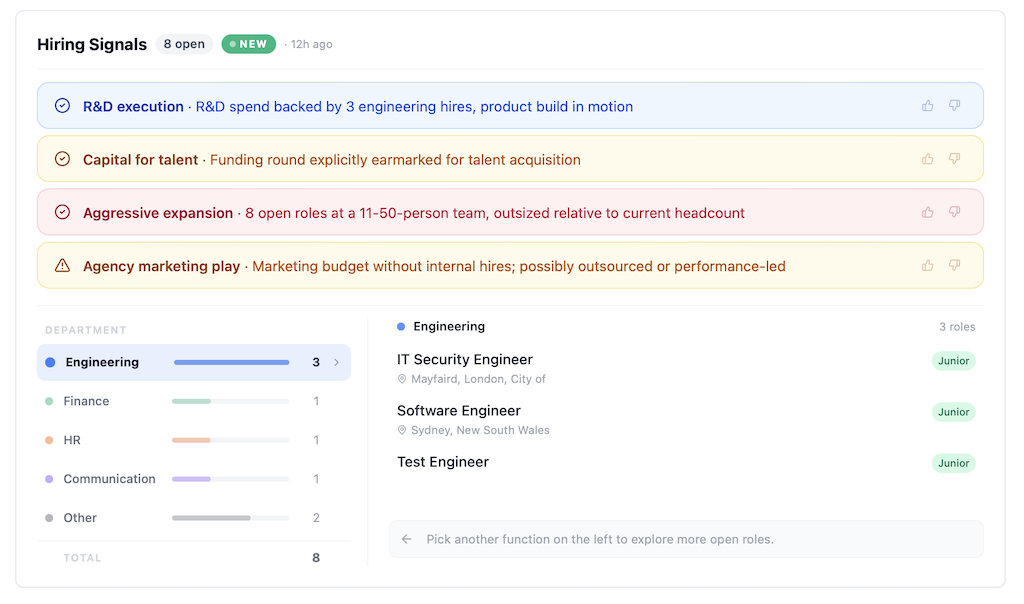
One important detail: Hiring Signals are computed from current open roles. A company with a quiet career page will show no signals. On a freshly funded company, that absence is itself information, a divergence pattern worth noting alongside everything else you know.
How to use it this week
Three motions worth trying first.
Re-rank your existing pipeline. Filter your saved companies to those showing confirming signals matching what you sell. These are the accounts where your outreach will land soonest.
Watch your divergence list. For each Spend Intent category relevant to your product, pull the divergence accounts. Track them weekly. The first hire against a divergence pattern is the moment to reach out.
Use the department breakdown to write outreach. Stop sending the same paragraph to every account. Open the Hiring Signals tab, look at the department your buyer sits in, look at the roles being added at their level, and write the first line about the team they are about to lead.
Hiring Signals are live now on every paid plan. Open any funded company in Fundup AI and look for the Hiring Signals tab.
The careers page has always been a buying signal. We just made it a legible one.


