Spend Intent Intelligence: From Funding Announcement to Capital Deployment Signals

Spend Intent Intelligence: From Funding Announcement to Capital Deployment Signals
Published: April 2026
In late 2025, we introduced AI-generated highlights for funded companies - bullet points summarizing key context from funding news, like "plans to expand into APAC" or "funding to support 50 new hires." These were useful, and a lot of you used them. But they were free text. You couldn't filter by them. You couldn't use them in ICP scoring. You couldn't export them in a structured way to your CRM.
Spend Intent Intelligence is the structured version of that idea. Same raw material - funding announcements, press releases, company news - but now parsed into machine-readable records: category, description, confidence, source. Every signal is queryable, filterable, scoreable, and exportable.
This post explains how it works, what it looks like in practice, and where it shows up in the product.
What a Spend Intent Is
When a company closes a funding round, the announcement almost always contains forward-looking statements. Sometimes vague ("to accelerate growth"), sometimes specific ("to hire 40 engineers and launch our enterprise product by Q3"). Fundup AI's pipeline reads these announcements and extracts the specific, actionable parts.
Each extracted signal is stored as a structured record with four fields:
- Category - one of: R&D, Product, Infrastructure, Marketing, Hiring, Sales
- Description - a natural-language sentence describing the specific intent
- Confidence - high, medium, or low, based on how explicitly the intent was stated
- Source - the publication or domain the signal was extracted from
Here's an example. Sample AI, a Miami-based health-tech startup that closed a $2.5M Seed round in April 2026, had five spend intents extracted from their PR:
Five distinct signals from one announcement. Three of them would be relevant to an infrastructure vendor. Two to a product analytics tool. All of them to anyone selling to digital health companies.
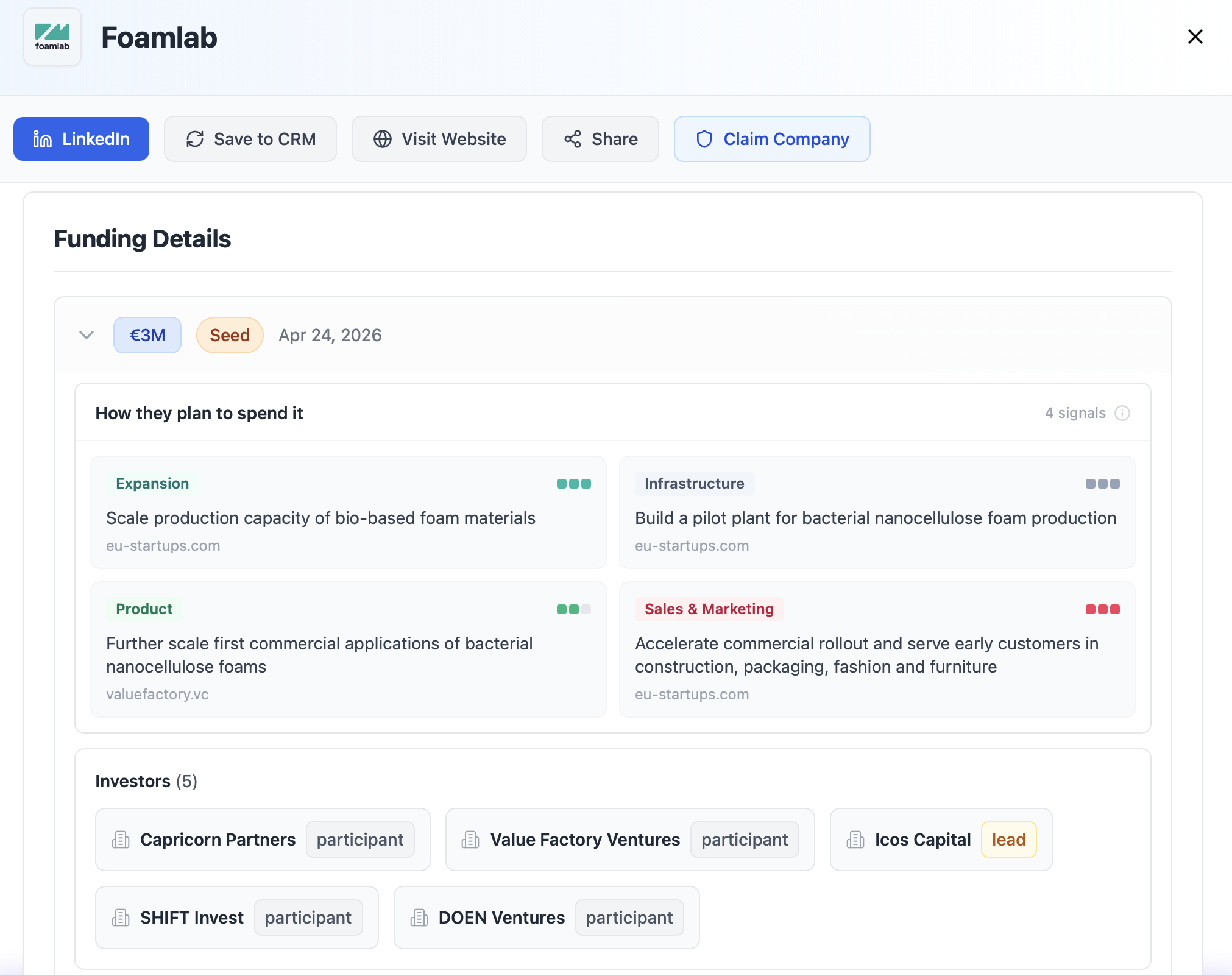
Spend intents appear inside each funding round's accordion in the company details modal, under "How They Plan to Spend It."
Where Spend Intents Appear
Company Profile
In the company details modal, each funding round now has a "How They Plan to Spend It" section that appears inside the round's accordion. Category badges are color-coded: Product is green, R&D is blue, Infrastructure is slate, Marketing is purple, Hiring is amber, Sales is rose.
Sidebar Filter
The Sidebar now includes a Spend Intent filter under Investors. Select one or more categories. The feed narrows to companies that have at least one spend intent in those categories.
This is useful in a few ways:
- A staffing firm filtering to Hiring sees only companies explicitly planning to bring on headcount.
- A cloud infrastructure vendor filtering to Infrastructure reaches only companies that said they'll invest there.
- A B2B SaaS product for marketers can filter to Marketing and combine it with Series A stage in the US.
The filter composes with everything else. Date range, industry, stage, country, ICP score - they all stack. Spend intent is one more signal, not a replacement for the ones you already use.
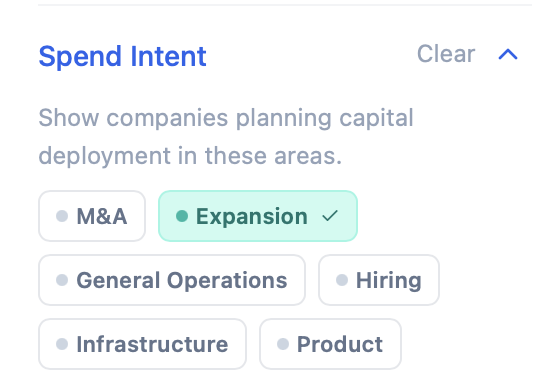
Spend Intent filter in the sidebar, composable with all existing filters.
ICP Settings
In Settings → ICP, there's a new Spend Intent Categories section at the bottom of the criteria list. Select the categories that match what your product addresses. A Spend Intent scoring weight row appears in the Match Scoring table alongside Industry, Geo Location, Company Size, Technologies, Tags, and Funding Stage.
The scoring logic is proportional - the same as tags and tech stack. If you select R&D and Product, a company with both categories in their spend intents scores higher than one with only one or neither. You control how strongly this criterion influences the overall ICP score with the weight buttons (Not scored / Low / Standard / High).
This is the most direct expression of Spend Intent as a buying signal. A company that just raised and announced R&D investment is closer to a buying decision for research tooling than one that raised and said nothing. The ICP score now reflects that.
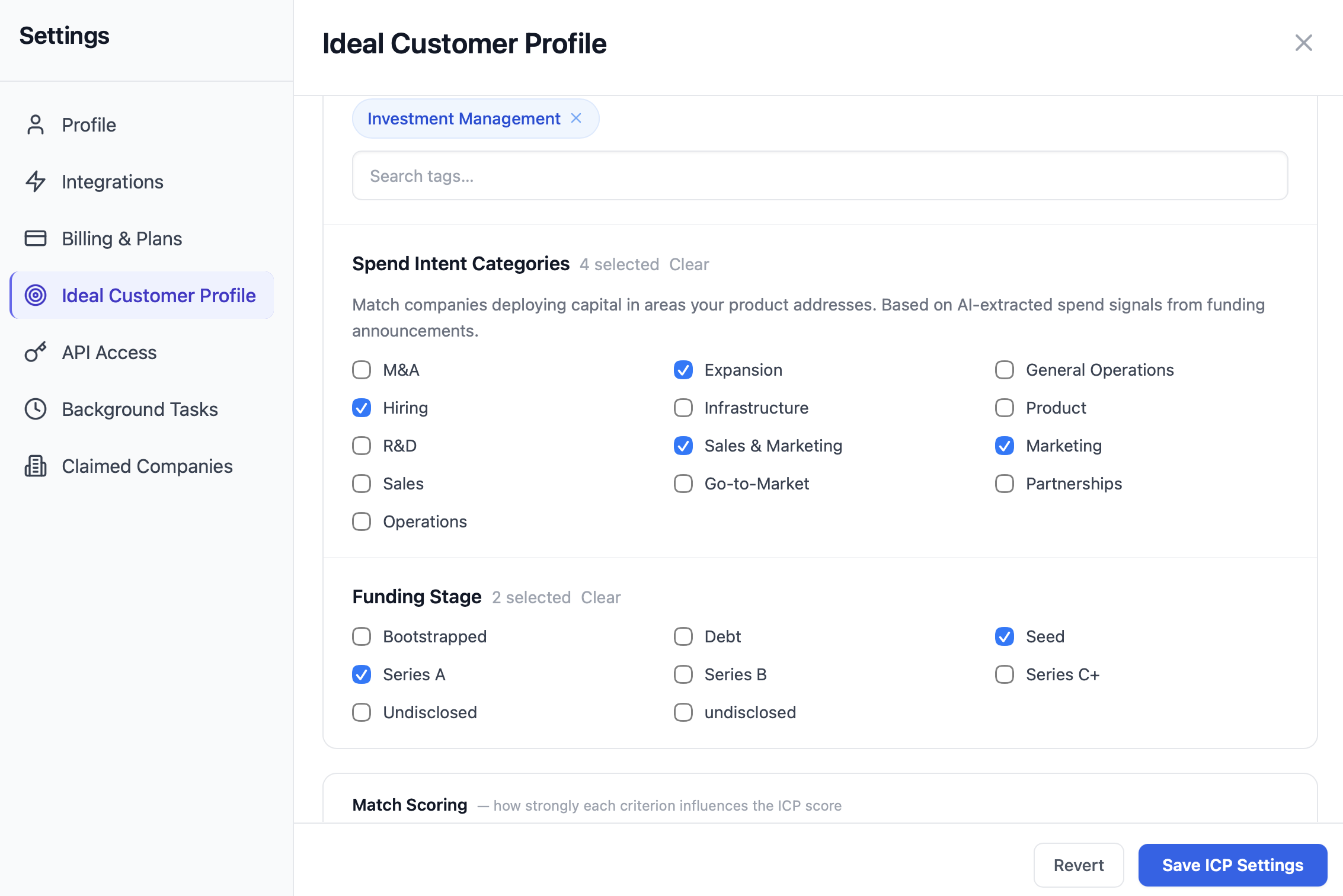
Spend Intent Categories section in the ICP settings, with scoring weight in the Match Scoring table.
Ask AI
Ask AI understands spend intent queries in natural language, including across languages.
Discovery queries like these now work:
- "show companies planning infrastructure investment last month"
- "find Series A startups with R&D spend signals in Europe"
- "which funded companies are planning to hire in the US?"
Ask AI extracts the spend_categories filter from the query and passes it to the database alongside any other filters it detects (date range, stage, country, etc.).
Why This Changes How You Prospect
Compare these two email openers for the same company after a $12M raise, from a technical recruiting firm:
❌ "Congrats on your Series A - exciting milestone for the team. I'd love to explore how we could support your growth."
✓ "Saw the TechCrunch piece - 40 engineering hires over 12 months. That's the volume where sourcing becomes the constraint before the bar does. We've closed 200+ senior engineering roles for Series A teams in the last two years."
The first could have been sent to anyone. The second is directly relevant to what this company just said they're doing, and makes it immediately obvious why you're reaching out.
When you ask Ask AI to draft an outreach email or LinkedIn message, it uses spend intents as the primary hook automatically. The output just reads better because the input is better. Higher specificity means higher open rates, more replies, more conversations. The signal was always in the announcement - it was just buried.
Confidence Levels
The confidence level is assigned based on how explicitly the intent appears in the source.
High means the company stated the intent directly and specifically. "We will launch our enterprise product for clinics and gyms in June 2026" - that's high.
Medium means the intent is clearly implied but not precisely stated. "Funding will support expansion of our wearable integrations" - medium. The category is clear, the description is reasonable, but there's more inference involved.
Low is reserved for signals that are plausible given the context but are less directly stated. Most of what appears in the product is medium or high.
For filtering and ICP scoring, all confidence levels are treated the same - the presence of the signal matters. If you want to apply your own threshold, the confidence level is included in the CSV export so you can filter downstream.
A Note on What This Isn't
Spend intents are extracted from what companies say publicly about their plans. They're what the company announced, not what the company will actually do. Plans change, especially after a fundraise.
The signals are useful for prioritization - they tell you which companies said they're investing in areas you serve, which is a reasonable proxy for likelihood to buy. They're not a guarantee. Use them as one input alongside ICP score, stage, timing, and your own outreach judgment.
Want to try it?
Open the dashboard: the Spend Intent filter is in the Sidebar now. For ICP configuration, go to Settings → ICP and look for the Spend Intent Categories section at the bottom.


